More rounds per table. Less walking. Nothing re-typed.
The guest scans the code on the table and orders from their own phone. The order lands in your BxPOS — in the same order flow your staff already use. No second till, no second catalog, and no app for the guest to install.
What you get out of it
Six things you notice on day one.
The second round gets ordered even when staff are outside
Guests don't wait to be noticed. In a café that is where most of the gain sits: a beer nobody got round to bringing is a beer you did not sell.
One trip to the table, not two
A guest asking for the bill picks cash, card or a split into N parts up front. The waiter sets off with the terminal in hand instead of walking over to ask first.
One order per table, not four
Everyone at the table picks from the same cart and it goes at once. The kitchen works that table once and the guests are served together — as before, minus the wait for a menu.
Nothing re-typed, nothing “I didn't order that”
What the guest picked is what reaches the ticket, note and all. No step between the phone and the printer is somebody's memory.
Foreign guests order without translation
The same menu in five languages, with descriptions and allergens. Staff stop miming ingredients.
Your till stays your till
One catalog — the one in BxPOS. Payment, the fiscal receipt and every report stay where they already are. No retraining and no double entry.
This is what your guest sees
Real screens from the portal, as they open on a phone — nothing drawn.
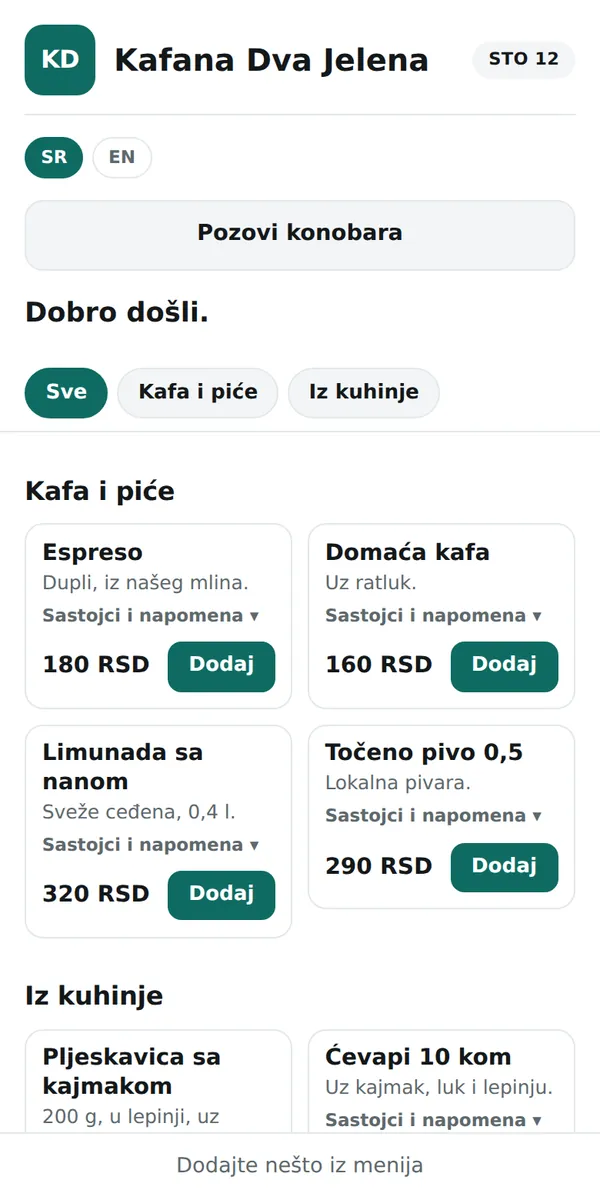
The menu
Opens in the browser in a second, with nothing to install. Categories, descriptions, prices, allergens — and a language switch at the top. Your logo and your colour, not ours.
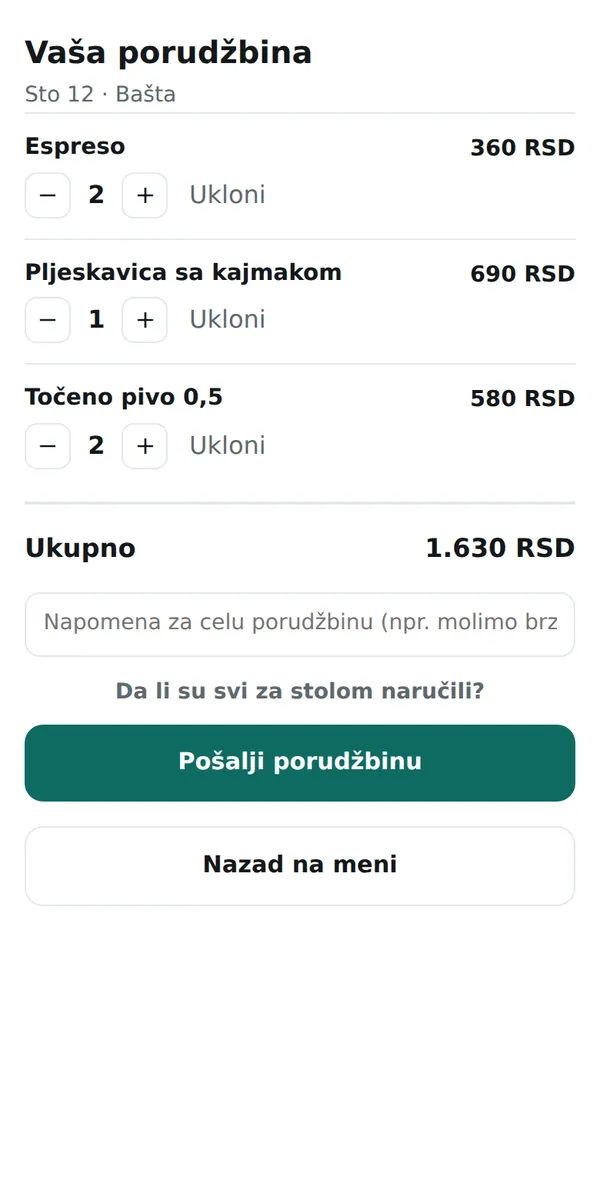
The table's cart
Every phone at the table adds to the same cart and watches it grow. Before sending it asks “Has everyone at the table ordered?” — which is why it does not matter who presses the button.
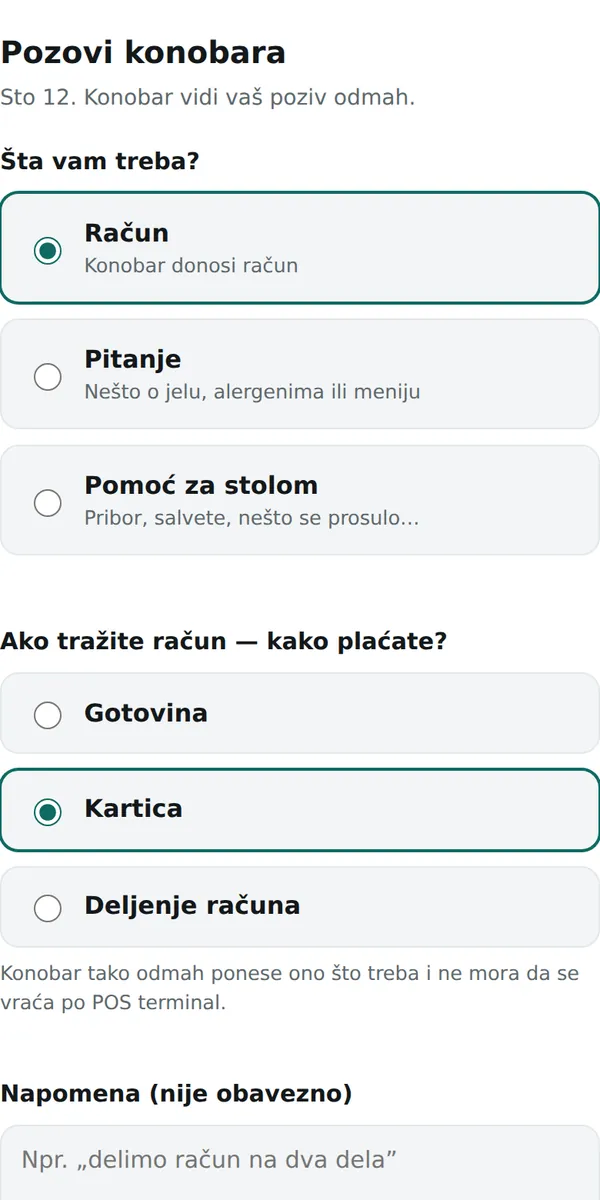
Calling the waiter
The guest asks for the bill, asks a question, or asks for help at the table. With the bill they say how they are paying straight away: cash, card or split. That is one trip to the table saved, every single time.
What the waiter gets
The floor screen stays open through the shift and refreshes itself.
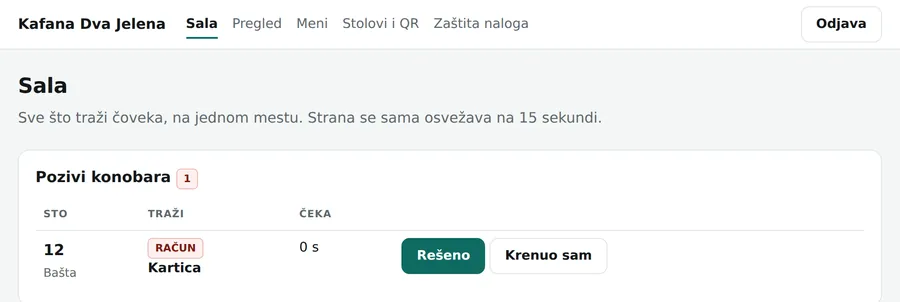
- Who asked for what, and how long they've waited
- A bill request already says how they're paying
- New orders arrive on their own, nothing to re-type
- A suspicious round is flagged and held, not blocked
- The guest's note sits with the item, not in someone's head
- Fewer empty-handed trips, more rounds served
How it works
Five steps, from the table to the fiscal receipt.
The portal is not a second till
The most common worry and the shortest answer: there is one catalog, and it is the one in BxPOS. The portal is its shadow on the web.
The portal does
- The menu the guest sees on their phone
- The table's cart and order submission
- Waiter calls and order status
- QR codes, tables, staff, translations, images
BxPOS does
- The catalog — the only one; the portal gets a copy
- Kitchen and bar printing
- Payment and the fiscal receipt
- Every report and the whole sales archive
You change prices and items in the till exactly as before. The portal updates itself and keeps no sales archive — nothing is entered twice and nothing can drift apart.
Every feature, briefly
Guest
- No app — it runs in the browser
- Five languages: sr, bs, hr, en, de
- One shared cart per table
- Quantities and a note per item
- Allergens and descriptions per dish
- Call the waiter: bill, question, help
- With the bill: cash, card or split
- Live status of the order that was sent
- No account, name or phone number
Venue
- Several legal entities, venues, zones and tables
- Printable QR codes — six per A4 sheet
- Code rotation: a lost sticker stops working
- Menu, images and translations from a screen
- Your logo, colour and cover photo
- The Wi-Fi password within the guest's reach
- Café and restaurant profiles (different defaults)
- Roles: owner, manager, waiter
- An audit log — who changed what, and when
POS and security
- Catalog sync from BxPOS
- The POS key is issued and rotated from the screen
- Rotation with a 24 h overlap — the till never stops
- Every API call is signed (HMAC-SHA256)
- The key's secret is encrypted in the database
- Two-factor protection for accounts
- Every venue in its own database schema
- A fake round costs nothing — it waits for approval
Data
- Guests have no account — no name, e-mail or phone is asked for.
- IP addresses and browser details are stored hashed.
- Each venue has its own database schema; isolation is enforced by PostgreSQL, not by a developer remembering it.
- The portal keeps no sales archive — the reports are in your till.
Want to see it on your own menu?
Get in touch — we connect your till, print the table codes, and the venue is live the same day.
Already using the portal?
Staff sign in with the venue code and their own account. The till is connected with a key the owner issues on the “Kasa” screen.